
Do you have sensitive information, documents, files or folders on your computer that you want to delete AND stay deleted?
If so, you need a Secret Service level file eraser like ExFile Pro Eraser !
Did you know that deleting files from your computer in the normal way is largely ineffective and in most cases the said file will be recoverable (either partially or almost fully) ? Normal deletion of data means the operating system just removes the file’s address, marking the space as available for new data, while the actual data remains until overwritten by new information, making it recoverable with data recovery software until then. For permanent deletion, you need to use specialized software like ExFile Pro Eraser that overwrites the data multiple times using state of the art algorithims, ensuring the data is unrecoverable.
With ExFile Pro Eraser you can be safe in the knowledge that your data will be overwritten to the point of being unrecoverable *
Suitable for windows 10/11, the software is a breeze to use, just add your file/folder/data and click secure erase and it’s gone!
Features :
- Portable version, no install needed
- 5 Secure erase algorithims to choose from
- Overwrite the file 1- 35 times in one click !
- Simplicity to use, no fuss or complicated settings
- Lifetime license included
- Free updates for life!
- For windows 10/11
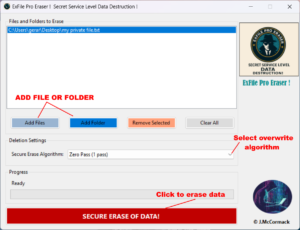
Don’t be caught out & rely on normal deletion with sensitive data, even if you delete these from your recycle bin THEY ARE STILL RECOVERABLE! Use ExFile Pro Eraser and be assured that your confidential data remains for your eyes only!
You can PAY WHAT YOU WANT for ExFile Pro Eraser below !
** Please note, as per our returns policy, no refunds can be issued on digital downloads and the distance selling 14 days right to cancel & receive a refund does not apply in this case.This is in accordance with distance selling regulations and our terms of service.See our refund policy for more information.