
Phantom Vault
(Secure Image-Based Message Encryption)
Want to send secret messages to someone that only they can read?
Phantom Vault allows you to securely hide secret (encrypted) messages inside PNG images using advanced AES encryption and steganography.It hides encrypted messages inside ordinary images with complete invisibility. Using strong AES‑256 encryption and subtle LSB pixel embedding, it ensures your information remains protected, concealed, and recoverable only with the correct password. The resulting images look unchanged to the human eye, making them ideal for discreet communication or secure data storage.
Your message is:
- 🔐 Encrypted with AES
- 👁 Hidden invisibly inside image pixels
- 🔓 Recoverable only with the correct password
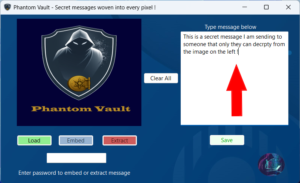
🛡 Security Overview
Phantom Vault uses:
- AES encryption (industry-standard symmetric encryption)
- Password-derived secure key generation
- Least Significant Bit (LSB) steganography
Even if someone suspects a hidden message, they cannot decrypt it without the password.
🎭 Phantom Vault is Simple to use !
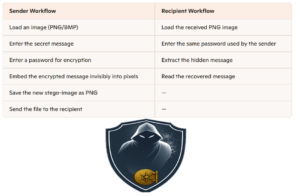
Phantom Vault provides a simple, reliable way to embed sensitive information inside everyday images—combining security, subtlety, and ease of use in one streamlined application.
System Compatibility & Requirements
Phantom Vault is built on modern .NET 8.0 technology and designed for smooth, secure performance on current Windows systems. It supports both Windows 10 and Windows 11, with no additional dependencies required beyond the standard .NET runtime.
Supported Operating Systems
- Windows 11 (all editions)
- Windows 10 (64‑bit, version 1809 or later)
Runtime Requirements
- .NET 8.0 Runtime is self-contained within the portable exe file, so no need to install this.
Hardware Requirements
- 64‑bit processor
- 4 GB RAM or higher recommended for handling large images
- Minimal disk space required for installation and secure image output
- Standard GPU support (no special graphics hardware needed)
Image Format Support
- PNG (recommended for lossless steganography)